Get ready for our new GCSE MFL Sequencing Tool
11 September 2025 |
|
|
Are you prepared for Multi-Factor Authentication (MFA)? |
Dear colleague
We’re excited to let you know about a new digital tool we’ll soon be launching for GCSE French, German and Spanish – the GCSE MFL Sequencing Tool.
You’ll need access to the sequencing tool to run GCSE French, German and Spanish speaking assessments in summer 2026. To help you get familiar, we’ll be releasing an interactive demo version of the tool before the end of the year.
The tool replaces the old paper-based sequencing grids, making it easier for teachers and exams officers to manage the allocation of task cards and thematic contexts for the various parts of the exam. The tool and its demo version will be available exclusively through the Pearson Portal, which means you’ll need to use Multi-Factor Authentication (MFA) to log in.
Why MFA matters
In 2023, we introduced app-based MFA to strengthen security across the Pearson Portal and platforms like Edexcel Online and ResultsPlus. It’s a simple but important step to protect student and centre data. |
| Our records indicate you haven’t logged into the Pearson Portal for more than 12 months |
|
|
|
That could cause issues when you try to log in, especially if you’ve changed device recently. In some cases, this means your MFA account will need to be reset before you can access the Portal.
What you need to do
To avoid delays in accessing the sequencing tool or its demo version when they go live:
- Log into the Pearson Portal. You may be asked to reset your password to meet our strengthened password requirements.
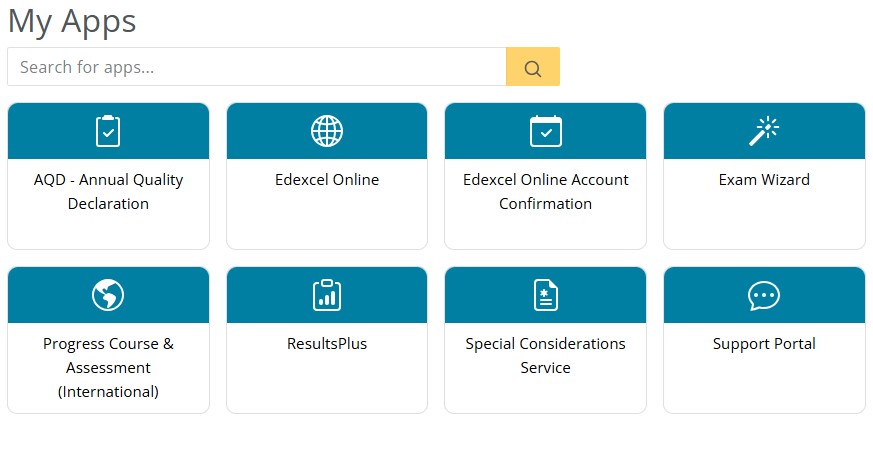
- Go to ‘My Apps’ within the Pearson Portal and check you can access one of the system tiles, such as Edexcel Online.
‘My Apps’ is the area in the Pearson Portal where you’ll be able to access the sequencing tool and its demo version when they are available:
|
Common issue to be aware of
One of the most frequent issues for existing MFA users happens when they’re using a new device. In these cases, your old device needs to be de-registered from the MFA app before you can register a new device. To do that, we’ll carry out a secure call-back to verify your identity – this helps protect confidential student and centre information from unauthorised access.
Please note: secure call-backs must be made to the number we have on record for your centre – unless you’ve added an alternative number to your Edexcel Online account (we shared how to do this in July 2025).
Need help?
If you run into any issues, you can start with our published FAQs or speak to your Exams Officer for help.
If you still need help, please check out our guide:
We’ll be in touch again when the demo tool is live, with more support and resources. In the meantime, if you have questions about how the tool will be used, email us at teachinglanguages@pearson.com.
Kind regards
Katy Lewis
Head of English, Languages & Creative Curriculum
|
Pearson Customer Services The Lighthouse, Manchester, M50 3BF Unsubscribe |
|
|
|