Achievement District Test Coordinator
Updates and Reminders - April 15, 2026 |
Achievement District Test Coordinators (DTCs),
The following state testing windows are now closed. Per Arizona state policy, test windows will not be extended.
- AASA Paper-Based Testing (Grades 3-8 ELA and Math - all test units)
- AASA Computer-Based Testing - Grades 3-8 Writing and Grade 3 Oral Reading Fluency test units
- AzSCI Grades 5, 8, and 11
- ACT Aspire Paper-Based Testing (Grade 9 - all test units)
- ACT Test Window 1 (Grade 11)
ACT Test Window 2 will close on Friday, April 17. All ACT online, accommodations, and makeup testing must be completed by Friday.
AASA Reading and Math test units will close on Friday, April 24. All AASA Special Paper Version Reading and Math test responses must also be entered in TestNav by Friday, April 24. All nonscorable Special Paper Version test booklets must be returned to Pearson after responses have been entered into TestNav.
All secure testing tickets and used scratch paper must be securely destroyed after testing. Test Coordinator's Manuals and Test Administration Directions manuals are not secure materials and may be discarded locally after testing is completed. They do not need to be returned to Pearson or ACT after testing. ACT online testing seating charts must be uploaded to ACT PearsonAccess Next as a Support Request after testing is completed.
Transfer Requests Reminder: When reviewing a transfer request in PearsonAccess Next for AASA or ACT Aspire, first check to see if the student has already completed testing. If the student has completed all test units, do not approve the transfer. Reject the transfer request and enter a comment that the student has already completed all test units. If the student has not yet completed all test units, the transfer request should be approved so the student can finish testing at their new school.
Reporting Groups
The Reporting Groups function in PearsonAccess Next is available for both AASA and ACT Aspire. If your school, district, or charter will be using reporting groups, they must be set up by April 24, the end of the testing window. A student can be in more than one reporting group.
For AASA, reporting groups will appear in the Student Data File, OnDemand Reports, and the Performance Level Dashboards reporting features. For students assigned to more than one reporting group, up to five reporting groups will be displayed in reports. See the AASA Reporting Guide for information about the "Teacher Report Viewer" role, which can be used to provide access to reporting groups, and the PearsonAccess Next User's Guide for information about how to create reporting groups. |
Test Irregularities - AASA, AzSCI, and ACT Aspire
Test irregularities are to be submitted in PearsonAccess Next (PAN) as soon as possible after an incident occurs, ideally within 24 hours. All test irregularities submitted in PAN for AASA, AzSCI, and ACT Aspire are being reviewed by ADE. If a test irregularity results in a test being invalidated, then ADE will mark the test as "Do Not Report" in PAN.
Emails are not sent to District Test Coordinators to confirm the status of test irregularities that have been submitted. Instead, please review the "Do Not Report Tests" operational report in PAN to view the current status. Access the "Do Not Report Tests" report in PAN at Reports > Operational Reports > Students and Registrations > Do Not Report Tests. Select "Display Report" or "Download CSV" to view invalidated test records. To view all tests that have been invalidated for the school or district, leave the "Test" dropdown selection blank and select "Exclude Unsubmitted Tests." If a submitted irregularity did not result in a test being invalidated, then it will not appear on this report. A final report may be downloaded one week after the closing of each test window.
The following Do Not Report codes will appear in the report for AASA or AzSCI.
- 4 = Student Not Eligible for Test
- 5 = Evidence of Student Cheating
- 6 = Inappropriate Test Administration
- 10 = Other
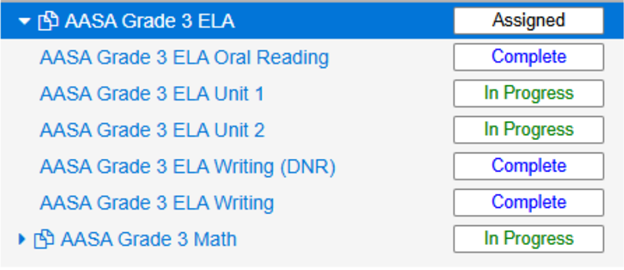
When ADE resumes/reopens a test for a student, PAN creates an additional line item in the Manage Student Tests tab, labeled "(DNR)", and includes the unit as "UNSUBMITTED" in the Do Not Report Tests report. Using the filter "Exclude Unsubmitted Tests" in the Do Not Report Tests report will exclude these from the report. |
|
Marking Tests Complete in PearsonAccess Next
Pearson is marking tests "Complete" for AASA and AzSCI. There is nothing test coordinators need to do to mark tests complete and end testing for AASA and AzSCI. A test status of "Marked Complete" indicates a test was in an active state at the end of the day and was forced closed by PearsonAccess Next to prevent a student from accessing it again at a later date. A test status of "Completed" indicates the student submitted the test. If a student fails to click the "Submit" button to submit their test, it will automatically be submitted at the end of the day. Students should not be returning to testing rooms or logging back in to submit their tests after they have left the testing environment, and there is no need for test coordinators to "stop" the sessions when testing is completed.
For ACT Aspire, a student's test status is automatically updated to "Completed" when they finish the test. If a student does not finish testing, the Room Supervisor should manually mark the student's test complete. It is not necessary for schools or districts to mark the "Will Not Test" checkbox in PearsonAccess Next for ACT Aspire students who have withdrawn or will not test. |
Bethany Spangenberg
Deputy Associate Superintendent of Assessment
Arizona Department of Education
|
|
Joseph M. Guzman, Ph.D.
Associate Superintendent of Standards, Assessment, Accountability and Research
Arizona Department of Education |
|
|
|
|
|
|


