Introducing the new GCSE MFL digital sequencing tool
29 January 2026 |
|
|
For GCSE French, German and Spanish teachers and their exams officers
Dear colleague,
We can see you’ve started making live entries for GCSE French, German and/or Spanish for May/June 2026. We want to make sure you and your teachers are fully ready to use the new MFL Sequencing tool in advance of the upcoming speaking exams, for these qualifications.
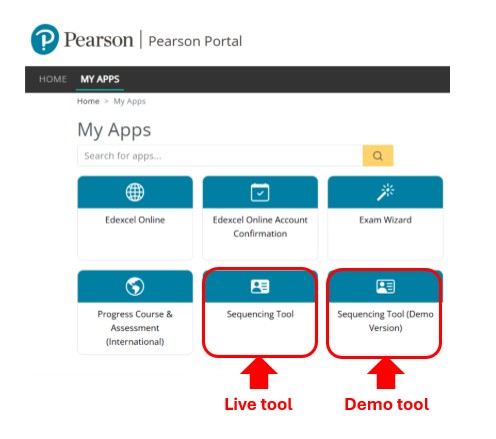
There are two versions of the MFL Sequencing Tool:
- Sequencing Tool (Demo Version)
This is your practice space. You can use it to explore the tool, try things out and get comfortable with how it works before you use the live version.
The live version of the tool is now available and this is where your live student entries are recorded. You - or your teachers - will use this version to input each student’s chosen thematic context during the window between 19 March and 2 April 2026. |
Here’s a checklist, followed by simple instructions on what you need to do - to help make sure everything runs smoothly: |
|
|
Make sure your MFA is working so you can access the MFL Sequencing Tools in the Pearson Portal.
Important: The Pearson Portal is your gateway to Edexcel Online and ResultsPlus. If you can already get into those systems, you’re all set - you’ll be able to access the Pearson Portal using MFA.
We’ve already shared guidance with exams officers and teachers on how to set up MFA for the Sequencing Tool. If you haven’t had a chance to read it yet - or you’re not sure your MFA is fully set up - please take a moment to review the linked communications that apply to you.
They’ll give you everything you need to make sure your MFA is working smoothly and that you can access the tools without any delays.
If other colleagues in your centre will be using the tools, please make sure their MFA is working too. |
To view the Sequencing Tools in the Pearson Portal, you’ll need the right permissions set up in your Edexcel Online account.
Once you’ve logged into the Pearson Portal, the next step is to make sure you - or your teachers – have the correct Edexcel Online (EOL) permissions in place to access the Sequencing Tools.
If users don’t see the ‘Sequencing Tool (Demo Version)’ tile, you’ll need to add the correct permission to their EOL account. The permission required for the demo tool is: Sequencing Tool (demo version).
If users don’t see the ‘Sequencing Tool’ tile (the live version of the tool), you’ll need to update their EOL permissions. The permission required for the live tool is Coursework and Portfolio.
If you’re a teacher and need help checking you’ve got the right permissions to access the tools, please speak to your Exams Officer or British Council Coordinator. |
|
|
You and your teaching team should take some time to look around the demo tool so you’re confident ahead of the speaking assessments.
In the Sequencing Tool (Demo Version) you'll be able to see how the tool works and practice using it in a low stakes environment, where you can reset the data and try using the system as many times as you want.
All teachers should practice using the Sequencing Tool (Demo Version) prior to the Speaking assessment in 2026 to ensure they know how to generate their students’ individual allocation of speaking cards when using the live version from 19 March – 2 April 2026. |
|
|
If you have any questions about the tools, please take a look at our support materials:
Support for the demo tool
Support for the live tool
|
|
|
In addition, our Languages team is offering a wide range of training events to make sure you and your teaching teams feel fully prepared for the speaking exams. Please sign up for the session(s) that work best for you. |
For MFA-related queries, or to request a secure call-back, please visit the Pearson support portal.
Kind regards,
Katy Lewis
Head of English, Languages & Creative Curriculum |
Pearson Customer Services The Lighthouse, Manchester, M50 3BF Unsubscribe |
|
|
|